Most developers charge extra fees for what they consider extra work besides the site itself. These fees can include SEO optimization, SMM (Social Media Marketing), business profile setup, and site maintenance. This piece is written to give you an insight of what goes into these extra elements and how easy it is to actually do it yourself. You may have been told that SEO is an ongoing process and is time consuming.
While it's true that SEO does take time to rank a site, it is not as time consuming as you may think. In fact, an hour or two a month is all it takes. SEO is a patience is a must element. What is meant by that is SEO does not happen overnight. It does not happen in a week. It can take several months or longer for noticeable results depending on your business cliche. The more popular the type of business is the longer it can take. Upon completion, SEO must be given ample time to work. Hasty changes will result in a decrease in ranking.
We are going to get into most aspects of SEO and site maintenance here. You'll learn how it's done and how often changes should be made on each aspect. You can then decide whether you can do it yourself or let the developer do it for you. You may find that the monthly or yearly fees some charge for these services do not coincide with the actual time it takes to complete these tasks. Today's modern developers have plug in tools that actually make some SEO tasks easy. With that in mind let's get started...
So you've made the move and got a website with all the bells and whistles including SEO (Search Engine Optimization) and you're paying anywhere from several hundred dollars to over a thousand dollars per month. The developer tells you that SEO is an ongoing process hence the high price. He may even tell you that the price includes "website maintenance." After a while you're told your business is at the top of the Google search engine. You're told to do a Google search for your business and who-la! There's your business at the top!
They did their job, right? You're business is exactly where they said it would be. Well, that depends on what you typed to find your business. Think about what you did for a moment. What did you type in the search box? What did you expect to see? Google utilizes a GoogleBot that crawls the Internet and finds new websites and automatically indexes them on their search engine. However, Search engines such as Google make no guarantee your site will even be found unless Basic SEO steps are taken. Once the site is found and indexed it is then listed on the search engine albeit it may not be at or near the top or found at all. SEO optimization takes care of that.
Let's get back to the search you did for your business. Did you type the exact name of your business? If the basic SEO was done properly and given ample time to work and you opened a Google Bussiness Profile and, after a while, you type the exact name of your business in a Google search box of course it will be at or very near the top. The only way, at this point, that it won't be at the top is if there's another business with that exact name and there website content is more SEO efficient than yours. The problem is users looking for a business like yours don't know the exact name of yours. They will, instead, use keywords and Keyword phrases (also known as Long Tail Keywords) to search for the business. That's where the real SEO optimization comes into play. The Basic SEO elements should be a part of every web page from the start.
The trick is to place keywords, keyword phrases, and meta tag descriptions that a potential customer will use when searching for a business like yours. That along with other key SEO elements is what gets sites ranked at the top of searches. The search engine algorithms read, evaluate, and rank keywords to deliver the most relevant results. It determines the user's intent by analyzing the keywords. When it comes to search engines there are three types of searcher intent: Informational, Transactional, Navigational. These are self explanatory. We will be getting more into keywords a bit later.
First, we'll dive into the website itself. Years ago website development was a tedious task and took weeks to complete. With today's technology and AI, web design has evolved into a relatively quick and easy task. Templates, code generating tools and java script has significantly cut the time frame. Most small sites with no or little product displays can now be completed in, some cases, a day. Sometimes, depending on the size of the site, within hours.
However, even if the developer uses templates, changes must still be made according to the design needed. Obviously, using templates is quicker than starting from scratch. But there's no denying that developers deserve to be paid for their time. Some will charge hourly rates, some will charge according to the size of the site. Some will include extras like several banners but, of course, there are fees for additional banners, etc. The bad side of templates is that quite a few developers use them for every site they do. So when it comes to creating a site to the exact look a client wants they are totally lost.
When should website be redesigned?
The website should be fully redesigned at least every 2-3 years to keep with SEO standards, technology changes and design trends.
That aside, if you're just starting out in business and are in the market for a website and don't know anything about web design you can be easily taken in. Get the word out that you need a website and suddenly everyone's a web developer. The offers are endless and it's enough to get your head spinning; $199 for this package, $300 for that package, $199 per month for SEO optimization, the list goes no and on. If you've done research you probably noticed that the prices mentioned are low compared to the some of the prices actually being charged. Then they'll charge other monthly charges for "extras" like hosting services. Are you really getting your money's worth? We'll start with domain & hosting fees...

Registering a domain name is quick and easy and, unless you pick what are known as Generic Term Names like beer.com or wine.com, domain names are very inexpensive with shared hosting. Generic Term Names are just that. They are generics for brand names. For example, Beer is a generic for beer brands such as Molson, Coors, etc. These names can be high in demand so there's usually a higher fee for registering, renewing and for hosting service as well.
Most likely your business name won't include a Generic Term Name so you won't need to worry about these high fees. There are also what are known as Premium Domain Extensions. .com is a domain extension. It is a TLD (Top Level Domain). These are inexpensive but a premium extension such as .bus, .fashion, .tip, .design, .online, .store, etc. can be very expensive. Some of these cost about $500,000.00 to acquire and yearly renewal is about $60.00 or more. For information on the types of hosting and prices go to our page on registering a domain name & setting up hosting service.
The bottom line is do your own homework before making a decision. Check into well known hosting companies like Entirelydigital.com, NameCheap.com, Hostinger.com, or Name.com. Entirely Digital offers both shared hosting and registry for under $100 per year combined. Getting your own domain name and hosting is quick and easy. The sites listed here will walk you through the process in minutes. You will, however, want to add SSL. If you're not sure what that is we'll be discussing it below in SEO Optimization.
SCAMS -
Be leary of extra monthly or yearly fees charged by web developers for domain hosting. It is better for you to get your own hosting service through a well known hosting company such as the ones mentioned above. The cost to register a domain name is $16.00 per year through Entirely Digital and the others mentioned should have similar pricing. For shared hosting the cost is $5.49 per month or less. Entirely Digital is located in Canada so if you're in another country like the USA there's a small International fee that's under a dollar.
The problem is some hosting companies will allow the purchase of as many domains as you want. Allowing a web designer to handle the hosting for you opens the door for them to boost the fee higher than what the hosting company is actually charging. We've found web developers, usually outside the USA, that are handling the hosting service and charging unsuspecting clients an outrageous fee for this service. They will purchase the name then tell you they have their own hosting servers when, in reality, they do not.
This rip-off is easy to spot, however, because the developer will tell you that you cannot have access to the server account. It's for security reasons they will say, because other sites are using their server as well as yours. This is a dead giveaway! No bona fide hosting company will tell you that you cannot have access to your account. In fact, when you setup the service you will setup log in information that only you will have access to.
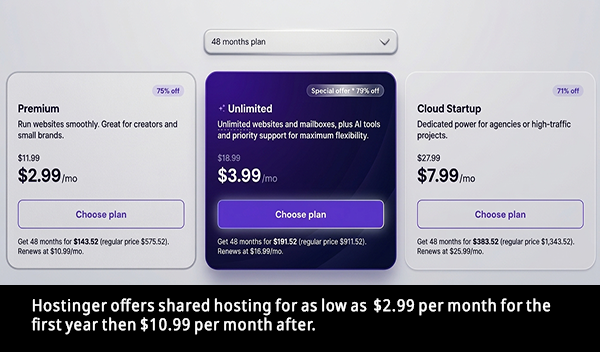
Most modern host providers offer shared hosting for under $6.00 per month. Some as low as $2.99. The problem is some developers will open the account for you and charge you an outrageous fee. Some charge as much as $350 per year or more when the actual payment is under $50.00. When called out on it they will tell you that the price also includes perks like server maintenance, SSL, 24/7 tech support, etc. Here's the truth, most of today's modern host providers offer such support. Let's explain that a bit farther...
There are two types of server infrastructures: Managed & Unmanaged. Most of today's modern host providers are fully mamaged. That means they handle just about all aspects of the service from security to tech support. They're fully responsible for the server environment. They take care of setup and maintenance, security, backups & recovery, and they monitor server performance. So the developer simply has to worry about the website itself and may have to upload the SSL certificate issued by the host provider. Umanaged on the other hand, is totaly different. The developer handles all aspects other than providing the hardware & network access.
There's another reason you should acquire your own hosting company, Most hosting companies have reselling options. Web developers can resell the company's hosting service and make it appear that they are the owners. The developer sells the hosting service as his own brand giving the illusion that he owns the servers. The developer has a master account enabling him to brand his own name using the supplied interface making the true hosting company invisible to clients. This allows the developer to charge any price he wants because the interface will only show his pricing not the prices of the parent company.
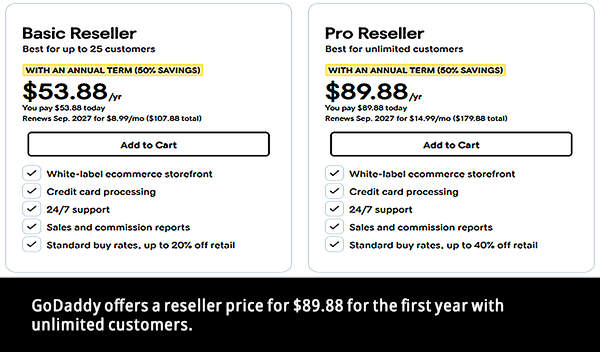
Hosting companies like GoDaddy offer reselling options for $89.88 for the first year and you can resell to unlimited customers for that one price. So, a dishonest developer will pay $89.88 per year and charge unsuspecting customers a much higher fee again telling the client that they have their own servers when, in reality, they do not.
As we mention on our page on how to register a domain & setup hosting service, it is possible to use your computer as a server. However, you have to really know what you're doing and your PC must have enough bandwidth, CPU & RAM to accommodate many websites. If your PC malfunctions, sleeps, or shuts down so do the websites. Servers that are used for this purpose can cost as much as $7,000.00 or more for the Data Center edition.
Here's a quick way to checkout who is the actual registrar & hosting company for a website. Log onto Whois.com and click on "Whois" in the top navigation bar. On a cell phone click the mobile navigation which is the three horizontal bars at the top right then click on "Whois". This should take you to the Whois Domain Lookup page. Type the web address in the search bar and the result will be the hosting registrar for that account. Look under the Registrar Information. There you will see who the name is registered with and the name servers.
The name server is not always the hosting provider. The name server is like a phone book. It matches the web address with the correct server IP address. They hold configuration data. Name servers usually come in pairs or more like ns1 abd ns2. If one fails the other takes over.
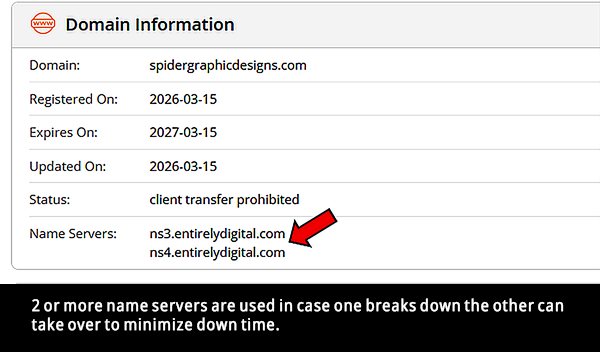
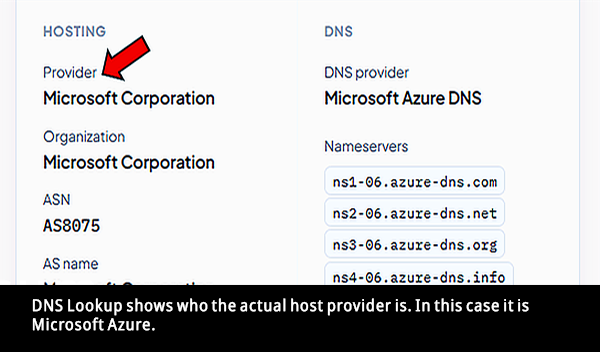
The registrar information tells you the name of the company that the name is registered through. The name server is usually also the hosting provider but to make sure you can check who the actual hosting provider is by logging onto NS Lookup. So the question is if a developer tells you they have their own servers but you find out they're using a server company like one of the ones above, why isn't their site on their server?
Take the time to search for hosting companies and be careful of these outrageous fees. A well known company like the ones listed above is usually your best bet. They are well known for their service and true pricing. The bottom line is domain name registration is renewed yearly and shouldn't cost more than about $20 per year for a .com name with shared hosting. Hosting on a shared server should be under $10 per month and can be as low as $2.99. Do your homework! Watch out for web developers who will tell you your site is on a dedicated server when in reality it is on a shared hosting platform. Get your own hosting company and avoid giving your hard earned money away.
One more thing about shared hosting, as mentioned above using shared hosting can effect load speed thereby causing a drop in SEO rankings. However, if you're just starting out and your site is small and does not contain any customer information or data shared is the way to go. As your site grows and you need more space you can then upgrade.
Also, Because your sharing bandwidth, CPU & RAM with other websites there is a chance of your site picking up malware from another infected site that is sharing the same. For that reason alone if your site will contain sensitive customer info. or data you do not want shared hosting.

You're about to get a look at some of the elements that make SEO (Search Engine Optimization) tick. You'll learn some of the tricks that developers use to get websites ranked on search engines such as Google. You'll learn just how easy it is to accomplish yourself and save on extra fees. However, SEO can be time consuming and ranking takes time and and this cannot be stressed enough, you have to be patient. Are the monthly fees for this service worth it or can one do it themselves and save money. We'll let you decide. We'll start with an ad you may have seen... A word of advice regarding Wordpress, studies show that an estimated 4.7 million Wordpress websites are hacked annually resulting in about 13,000 successful breaches daily making Wordpress sites the number one target for cyber attacks. One of the reasons it is a target is due to the fact that it powers over 43% of all websites globally. Sites running on an outdated Wordpress platform or outdated plugins are easy targets. So, if your site will be on Wordpress make sure your developer is using the latest platform and plugins. Wordpress states that the platform does update frequently but your site has to be maintained.
"Get our SEO services and you will not only rank on the first page of Google but you will have 80,000 visitors per month and 15 new customers daily!"
Did that catch your attention? Of course it did! It would catch anyone's attention that already has a website or is in the market for one. You want your site found and you want results. However, the above "sales pitch" is just that and will not happen on the same day or even overnight to say the least. In fact, the only way your site will be ranked quickly at or near the top is by creating a Google Business Ad. Otherwise, and this cannot be stressed enough, SEO optimization takes time no matter what someone tells you. It doesn't happen overnight. It doesn't happen in days. It doesn't happen in a week. It can take months to get results depending on your competition.
If you create a Google Business Profile, claim your business and verify that you are the owner, your business will be listed on Google and may be found by local customers. However, depending on the competition's ratings your business may not be seen until scrolling way down on the list. It can take up to 14 days for your listing to appear in Google searches but can be farther delayed if it is flagged for any reason. Here's the kicker, while your profile will be searchable, exactly where will it appear? Most likely it will not be anywhere near the top of the search unless you created a Google ad.
But what if you're just starting out and don't yet have the necessary funds to pay for Pay-Per-Click ads such as Google Ads that can get a bit pricey? While you do set the price limit for Pay-Per-Click ads keep in mind that if your competitors are paying a higher bid they can outrank you. Besides PPC's, There are other factors that are also indicative to search engines such as Google and will help rank your site. We will get into these below.
It can take up to 3-6 months, or sometimes less, to see measurable SEO results depending on how competitive your industry is. If you're in an extremely competitive business, it can actually take up to a year. At first you will start to see momentum then results with clear indicators of progress along the way. However, if a competitor is using the same target keywords and his site content is better optimized his site will rank above yours. Websites must be updated regularly but just how often is "regularly"?
If you have a developer do the extra work of SEO for a monthly or yearly fee, ask yourself if you're really getting your money's worth. With today's technology little work needs to be done on the part of the developer when it comes to SEO. If your site was created using Wordpress or Shopify they can institute plugins that automate technical tasks and give real time guidance. These plugins can edit page titles and meta descriptions, generate site maps and schema markup, analyze content and handle 301 redirects and even help with SEO optimization. These plugins even offer suggestions.
Three such plugins are Yoast, Rank Math and All in One SEO. Yoast is a tool that helps optimize primarily Wordpress & Shopify sites for search engines like Google. Rank Math is an advanced Schema generator and also monitors links. If you're just beginning, All in One SEO features a setup wizard and a comprehensive site audit checklist. Too many plugins, however, can slow down your site speed which will hurt rankings.
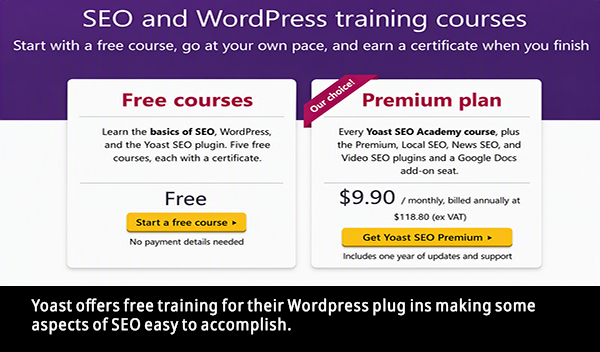
SEO optimization is the most important aspect of any website so we're going to spend some time on this subject. It is incorporated into a site for one main reason.. to get noticed on the web and turn clicks into sales. SEO (Search Engine Optimization) is a feature every website needs. 93% of today's websites are found through Internet Searches. It is the very reason every business needs a website in today's world of competition. The competition is fierce and everyone is vying for the top of the search engine. You want your site to be found because if it's not you're losing business.
You not only want your site to be found but you also want customers to perform a click through that ends with a sale. Yes, SEO is an ongoing service. Key elements need to be updated to let search engines know your site is active and relevant. But there is a limit to just how often changes should be made for SEO purposes. Too many hasty changes will actually hurt rankings not help them. Here, you'll learn about the elements that makes SEO tick and when changes should be made to keep your site moving up in rank.
As already mentioned, getting to the top of searches takes time but once there your site will receive approximately 28% to 40% of all clicks. Second place gets 15%-18% and the third gets 10%-11%. So, over 50%-68% of total clicks go to the top 3 combined. So you can see that the lower your site ranks the less chances of getting click throughs. The type of SEO optimization you need depends on whether you want your site to be found locally or world wide. We'll be getting into both. We'll start with how search engines work...
Major search engines such as Yahoo, Bing and others have what are known as Index Crawlers. Google uses what is known as a Google bot. These crawlers discover and index websites automatically by navigating the Internet usually through links. They scan HTML, images, keywords and more and make it searchable by storing the info. in the search engine's index. This in no way guarantees your site will be found or even listed on the search engine. That's where SEO optimization comes into play. Part of Basic SEO is done by adding meta tag descriptions on the page that gives search engines information needed to index your business on the search page as well as using ALT tags for images.
When creating a website it is important to know just how searches work. Search engines such as Google read a web page's HTML code from top to bottom, line by line. Each document is parsed from the opening HTML tag to the closing HTML tag. This is where titles, headings, and meta descriptions come into play. Placing them near the top of the page helps search engines process and understand the core topic faster. The mistake made by some developers is that they place large blocks of java script or CSS before the main content causing the crawler to stop or delay processing lower parts of the page. For this reason all java scripts should be placed at the bottom of the page just before the closing body tag and CSS files should aways be in a separate file that is called on the page.
Tens of millions of new web pages are processed every day by search engines like Google. Google themselves maintain a web index containing hundreds of billions of documents. They are, by far, the leading search engine. Links and sitemaps are just two elements that help sites to be discovered and we'll be covering them below. Wanna know if any of your pages have been found? Type the following directly into a search bar: site:yourdomain.com. Replace yourdomain.com with your website URL. Search engine
Search engines' algorithms constantly change with minor adjustments daily that go virtually unnoticed and do not require website owners to change their strategies. Major changes are made several times per year. Significant updates usually happen 3 to 5 times per year. These updates include spam targets and AI generated junk. To find out the latest changes log onto Google Search Status Dashboard.
Again, these are just basic SEO elements that should be incorporated into the page at the time of creation otherwise the site is useless. It's just an online document with images and wording. These simple search engine elements are needed but will not guarantee your site will be found at the top of searches unless, as mentioned above, you type in the exact name of your business. In fact, there is only one sure way to get to the top of any search engine quickly like Google and that is to pay for ads such as Google ads. These are Pay Per Click ads that give you the power to set the amount you wish to spend and, depending on the amount spent, will list you near or at the top of searches. You bid on keywords and pay only when a user clicks on your ad. For more information log onto ads.google.com.
Google ads can get very costly but there are other ways, however, that can get your site ranked high on search engines and possibly at the top of the page. But keep in mind, and we can't stress this enough, SEO optimization takes time. It does not happen overnight. It does not happen in a week but can take several months. Patience is a must. It does not matter how many times you make changes to keywords, phrases or perform site maintenance. It will not speed up the time it takes search engine crawlers to find and index your site although there are tricks to hasten the process. In fact, making too many hasty changes too soon will decrease SEO rankings.
Even after your site ranks near or at the top it should still be updated so that it stays competitive with the competition. Technical issues need to be constantly fixed and elements such as linked texts and other aspects need to be changed often to keep your site ranked high.
Once a site is ranked at the top making changes most likely will affect it's position. Although the drop in rankings may be temporary it can be as long as several weeks. Minor changes may not make a difference but changing or removing content that is already performing high will risk losing the position already established. For example, altering a meta tag or keywords that are performing will cause a drop in rankings. Search engines like Google must re-crawl and re-index new content so even positive changes could cause a temporary dip in rankings.
The most dangerous change is the URL itself. Changing it without a 301 redirect can cause a site to lose all ranking authority. The same goes for heading tags, keywords, and layout changes. Why would you want to remove or change keywords that are already working? Don't let anyone tell you that by not updating often you're just getting the same "traffic." Isn't that for you to decide? A 301 re-direct is a DNS server side HTTP code that automatically sends users to the new URL. This can be done through your domain hosting service. It also can be done on the client-side of the website by adding a Redirect in the Head section but browsers don't treat it as a good move and is not a good condition for SEO.
We should note that when we talk about ranking at or near the top of a search we're not talking about searching for your exact business name by typing it in the Google search bar. As mentioned above if you opened a Google Business Profile and your site was listed properly in Google Search Console, your site will appear at the top of a search if you type the exact name of your business sometimes within days if it was listed correctly. This shouldn't surprise you at all.
As mentioned before but is well worth going over again, in the real world a user will not type your exact business name when searching for a business like yours. They will type keywords and keyword phrases. If Bobby is looking for a place to buy shoes he's not gonna type "Karen's Shoe House" or "karensshoehouse.com" unless he already knows about them and wants to buy directly from them. Until your business becomes known the chances of someone typing your exact URL or business name is zero to none. With that in mind, let's get into the elements that make SEO optimization tick and how you can do it yourself. Next we're gonna go over all the pertinant elements of SEO and site maintenance as well as how and when to make changes. There's a lot to take in and you may have to go over it several times but soon you'll relize just how easy it is to do yourself.
First and foremost, if you haven't yet done so you'll want to setup a Google Business Account and place your first Google Ad. If you don't yet have a Google account you'll need to create one. This first step will get your site started on the road to SEO and is actually the most important step. Google Ads are pay per click ads and sometimes as a perk for opening a busiones profile you may be given $500 worth of free clicks on your first ad. I believe you have up to two months to use it. Again, they may not be offering this when you open your account. Upon completion of your site and it has the basic SEO elements it should be immediately uploaded to search engines such as Google and Bing. This should be done by the developer. Uploading the site gives it a head start on the road to SEO. You can actually do it yourself. Here's how... You may have to choose a verification method to prove ownership. To upload your sitemap click on "Sitemaps" in the left pane. If you're not sure what a sitemap is we'll be getting into that shortly. We should warn you to make sure the developer has not already uploaded your site to search engines
This important first step will get your site listed on Google and, depending on the amount you spend, a Google Ad will boost your ranking. The rest of SEO discussed below will also help in ranking your site. Click here to go to Google Business Profile and follow the instructions. You may be asked to verify your business. Once you've established your business on the Google Business Profile and you want to create your first Google Ad log onto Google Ads.
When should Google business profile and Google ads be updated?
Your Google Business Profile should be reviewed for updates at least once a month. Check if changes are needed for your business hours, images & videos, offers & events and reviews should be minitored and responded to within 24-48 hours. Google ads should be avaluated every 1-2 weeks. Ad keywords should be reviewed 1-3 times per week for acounts accumulating high business.
First, before you can upload your site, you'll need to verify your site ownership. Follow these steps to upload to Google. Log onto Google Search Console and sign in with your Google account. Click on URL Inspection in the left panel. You'll notice the light blue bar at the top left that reads: "Search Property." Type in your exact website URL then click on "REQUEST INDEXING." Your site will then be indexed on Google's search engine.
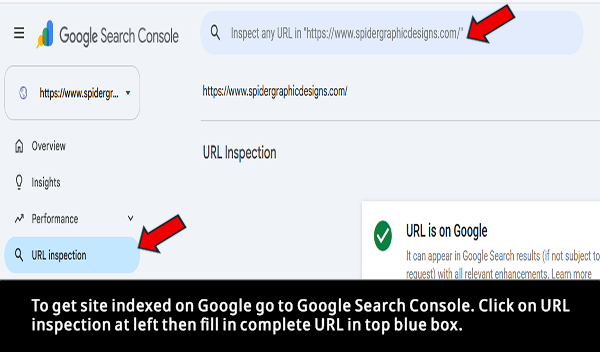
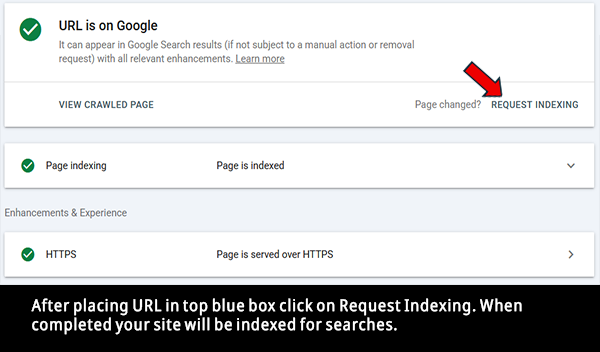
before you upload it. Uploading a site more than once can trigger duplicate content issues and effect SEO ranking.
IndexNow.org is a great way to submit your URL to search engines like Bing. To submit your URL directly to Bing & Yahoo! Log onto Bing Webmaster Tools here. Don't forget to submit to others like DuckDuckGo as well.
How often should site be resubmitted to search engines?
You only need to submit your site one time because once submitted search engine crawlers will automatically revisit your site to update their listings. However, you should resubmit your site after doing any of the following: Publishing new content, structural changes, or after repairing any technical errors.
This is a very important step and should never be overlooked. Making a site search engine friendly involves elements on the site that make it easy for search engines like Google to crawl and index your site. These elements should already be a part of the site by the developer at creation. Clear, precise descriptions and site maps are some of these elements. We'll dive deeper into these later. Search engine friendly elements are a basic part of every website or at least they should be. SEO Optimization takes it much farther. You will learn about the elements that make a site search engine friendly below.
Create trustworthiness by adding content that answers real user questions and update it every 3-6 months. Remember, updating too often will cause a dip in rank. A Q&A page is a great way to answer important questions users may ask. If your site does not include a Q&A page have the developer add it and make sure it answers pertinent questions users may ask about your business. This is essential for SEO and should not be overlooked.
How often should Q&A pages be updated?
Q&A pages should be reviewed and updated monthly. Include new questions that were asked and be sure to keep answers to a maximum of 2-3 short paragraphs.
Load speed can directly effect rankings. A site that is slow to load will rank low. Your site should only be as big as needed. A site that has eye catching visuals like large banners that move, animations all over the place on every page, and videos are all very nice but these tend to slow down load time unless a pre-load tag is used but even that is no guarantee. A cluttered site is a slow site and effects rankings. The slower the load time the lower a site is ranked on search pages. This cannot be stressed enough, make your site with only the elements that are needed and no more. Instead of a cluttered site, Focus on a more search engine friendly design. To test your sites load speed log onto GTmetrix.com. If your site's speed score is too low talk with your developer.
How often should sites load speed be checked?
All the pages should be checked at least once a month. They should be checked immediately after making any changes. Google PageSpeed Insights is a great place to get page speed insights. There you can download the results in PDF.
Your site can look fantastic on a PC but in today's world over 80% of Internet views are on a mobile device. Believe it or not, this can greatly effect search engine rankings. The site must flow like liquid on every screen size including mobile phones, lap tops and tablets. Search engines changed their algorithms to include smaller screens. It's easy to check your site on any screen size.
To do this log onto your website from a computer or if your on a PC now you can do it on this page. Click the Minimize Screen button (button with overlapping squares at the top right of screen). Place the mouse courser at the far right side of screen until the courser changes to a double arrow. Slowly move inward while holding the left mouse button down. The elements on the screen should flow like liquid as you move the screen size in or outward. Notice how the elements on the screen flow like liquid as you change the screen size.
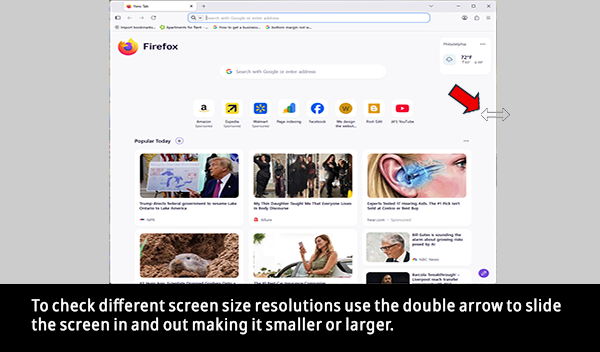
Notice that as the screen gets to a certain size some elements actually disappear. This is done purposely to keep elements like images & text from interfering or bleeding into each other on smaller screens. So when viewed on a mobile device the user may not see some elements but will see them on a larger screen like a PC. Pretty cool, huh? You should check your site's different screen sizes on a PC once it's completed and if something doesn't look right contact your developer. You payed for the site so it should be the way you want it.
How often should sites be checked for screen compatability?
Websites should be checked monthly to make sure it continuously flows with any screen size and should be checked immediately after any changes were made. Navigations, fonts, and buttons should be checked annually to make sure they meet any new browsing standards. Google Search Console and Google PagSpeed Insights are great tools to use. They will test for errors and load times especially for mobile and give recommendations.
Internal linking sounds very technical but it's really simple. Internal links are simply hyperlinks that connect one page to another page of a site. These links are used by search engines to discover new content and helps them understand important pages. This improves crawlabilty and indexing which, in turn, will increase rankings. There are 4 types of internal links: Contextual Links, Navigational Links, Footer Links, and Breadcrumbs. Links are clickable texts that describe the target page. They help both the user and search engines to understand the context. They are crucial in helping search engines facilitate indexing and boosts overall visibility of a site.
Link quantity should be limited, however, because too many links will tend to impede search engines in identifying important content. Broken links will cause a drop in search engine rankings so regularly check for and fix broken links (404 errors). Links can usually be found near the top of the page in the <Header> section and in the <Footer> section which is at the bottom of the page. Home, About us, Contact us are clickable links. When clicked they will take you to that particular page or to the anchor on a single-page site.
Go into any website and right click anywhere on the page (don't do it on ours because we have disabled the right click). In the window that pops up click on View Page Source. If you're not familiar with HTML you now have your first look at it. You will notice certain tags on the page like <HTML>, <Header>, <Title>, and <Body>. These are known as the web page shell. All the pertinent information is within those tags. The tag with the back slash (/) signifies the closing tag. A tag with a link will may something like this:
<a href="jimscookies.com/contact.html">Contact Us<a/>.
Notice the two <a> tags. The first is the opening tag and the second with the back slash is the closing tag. Inside the first tag (a href) is the actual URL where you will be taken when the link is clicked. Between those tags is the clickable text: Contact Us. Today's website links can be a bit more complex with the new HTML Language (HTML5) & Java Script but you get the general idea.
There's a quick way to find and change the clickable text for a link or even the landing page it goes to. First, make sure you have all your website files in a safe place like a flash drive. If your developer did not give you these files get them. They're your files. You paid for them. The trick is to locate the page you want to make the change on. Here's the easiest way for a beginner. Log onto your site using your browser and locate the link you want to change. Place your mouse pointer on that link and look at the lower bottom left corner of your screen. There you will notice the URL address for that page. It may look something like this:
jimscookies.com/contact/
Notice that contact does not have any extension like .HTML. That tells us the file needed is in a folder named contact. You should see this folder within the website files. Inside that folder should be a file named index.html (note this file may have another extension other than html). The index file inside that folder is the page you're looking for. If the URL address for the page in question looks like this:
jimscookies.com/contact.html
Remember, the html extension tells us that's a clickable file. It's obviously not insdie a folder so contact.html is the file we're looking for. When looking through your website files you probably wont see an extension like html. Instead you may simply see a file that reads contact. To make sure you have the html page in question highlight the page then right click and click on Properties then click Details. You should now see the file name with the extension like HTML. Copy the page to your documents (never make changes to the original page. Always make a copy and make changes to the copy).
With the link still highlighted on your site in your browser, right click. Click on Copy Image Link. Now go to the page you copied to your documents and highlight it then right click on it and click Edit In Note Pad. You should now see the HTML source file code for that page. At the top left click on Edit then click on Find. In the search bar that opens paste the link you copied. You should now see that link highlighted in the source code of that page. You're now ready to make the change. Pretty simple, huh?
You should also be able make this change directly from your hosting server. Log onto your hosting service. We are using Entirely Digital so we are using their interface to edit. Your hosting service may work similar. Once logged on click on your site then click on Log Into cPanel then click on File Manager. Click on Public_HTML and you should see all your pages (files). Highlight the file that contains the link you want to change and click on Edit at the top of page.
You should now see the HTML source code at the left. You should see a search bar at the top of the page. If not there should be a search icon. Click that to open the search bar. Paste the highlighted code from the clipboard into the search bar. The HTML source code for that link should now be highlighted in the HTML source at the left. You are now ready to make the change. If you want to change the clickable text from "Contact Us" to "Contact Jim" change that text. Then save the work. When you open that page the clickable text for that link will now read "Contact Jim" instead of "Contact Us". Pretty simple, right? Clickable links should not need to be changed unless the URL of the page changes. You may, however, want to change the clickable text part but even that doesn't need to be changed too often. If it describes the link well no change is needed.
How often should internal links be checked?
Every 3-6 months you should do a check on links to make sure they are still working properly and take you to the proper destination. However, if you frequently publish content they should be checked monthly. Use the Links report in Google Search Console.
A Landing Page is a bit different from the other linked pages of a website. A page that is part of internal linking is an inner page also known as an interior page. They take you to standard pages like "About Us", or "Contact Us." A landing page is built for a specific marketing campaign that calls for a single action. It is a standalone page. This page is usually has no navigation links to distract users to click away from the goal. Their main purpose is to get the visitor to fill out a form, buy a product, or download something.
Landing pages are built to highlight a specific purpose unlike general web pages that serve multiple functions. Some of the features a landing page should include are a headline, subheading, concise content, strong visuals, and a call-to-action. Some areas landing pages are used for are collecting contact details, promoting products, encouraging sign ups, offering new products, and offering updates or incentives to grow your email list. These types of pages help with SEO by improving organic traffic, addressing user search intent, and boosts conversion rates. Like the interior pages of a website, landing pages also use targeted keywords.
Towards the top of the page source, between the <head> tags, you will notice what are known as meta tags. These tags play a key roll in Search Engine Optimization. These are at the top of the page and are very important because search engines like Google read the source code linearly so the Header tags of a page are analyzed first and will hold more weight for ranking. You will notice that one of the meta tags is the description and will look something like this:
<meta name="description" content="jim's cookies are the best in the west. Our secret recipe has won several baking awards">
The meta name tag describes the element. In this case it's the description. The content tag is what gets used by the search engines and contains the description of the business. If Jim's cookies is shown in a search, the content of that meta tag may be shown as a snippet. 28%-30% of the time Google may create a custom snippet from the description if it deems necessary. So, the content should be descriptive and under 160 characters to increase being used.
If you wish to make a change to this tag or any element within the page it's quite easy to do. Some hosting companies have CMS (Content Management System) built-in with their services that allows you to edit your pages without downloading it. Entirely Digital is one that features editing software. Here's how it's done:
Log in and go to your files like we just did above. While servers can be reconfigured to serve any file name as the default home page, The file labeled index is the industry standard. This file usually has the HTML extension but may have a different one depending on your site. It can also be one of these: PHP, XHTML, SHTML, DHTML, ASP, JSP, or XML.
A strong word of caution regarding CMS, if your site will contain any customer information or data you'll want to make sure the CMS is patched. Patched CMS is a management system with security measures. Some hosts offer pre-installed software for platforms such as Wordpress. However, if going this route make sure Wordpress updates their platform on a regular basis or it's a waste. We've mentioned this before but it's worth mentioning again, Wordpress is the number one hacked platform.
You may see some yellow folders as well with the site files. These folders also contain site files. We want to change the meta description tag on the home page so we want the index page. Click on it to highlight it then click on Edit. The HTML source page should now be open. Notice the numbered lines on the left side. Those will come in very handy. The meta tag we want to change should be easy to find because they are always near the top of the page. To change the description, simply change the phrase between the quotes after the content tag. Be sure not to delete the quotes and don't forget to save the changes. Since the description tag contains keywords it should be checked every 3-6 months. We'll be getting into how to do that next in the section on keywords.
If your hosting company doesn't offer CMS or editing software simply download the file to your documents. Highlight it, right click, click Edit In Note Pad and locate the <meta name="description" content="... This will be near the top of the page. Make the change to the text between the double quotes (""). Once the change is complete you'll then need to upload the file to the server. Upload it exactly where you found it to download.
How often should meta descriptions be changed?
Generally speaking, meta descriptions should be audited every 3-6 months or if a page undergoes a significant update or you notice a drop in SEO rankings. Google may rewrite meta descriptions 60%-80% of the time so that the users exact intent is matched. If you notice your description is being changed by Google, it may be a sign that it's time to update the text. Keep your descriptions between 140-160 characters. Tell the user what they will find on the page and why they should click through. And most importantly, add a Call To Action. Example: Learn more about us.
You may or may not see this tag in the <Head> section inside a meta tag. Search engines like Google have stopped indexing meta tag keywords due to constant abuse although some web developers still prefer to use them inside the meta tags. Instead of using them in the meta tags, keywords are now incorporated into the content of the page and as part of the description meta tag mentioned above as well as between the <Title> tags. Specific keywords are also used in the <Body> of the page within heading tags.
According to Google they have not used keywords for rankings in many years so don't waste your time on these. Instead of meta tag keywords more time should be spent on creating high quality content that answers the user's intent. The Title, URL, and the first paragraph should contain primary keywords. However, if you do notice a meta tag for keywords it will look something like this:
<meta name="keywords" content="cookies, best cookies, best cookies in Los Angeles, best tasting cookies, value priced cookies">
You will see keywords in use when we discuss Title Tag below. Do you remember what you noticed on our home page when you first logged on? In the About Us section you probably noticed at the top it read like this: "Get a website and an education!" That is a keyword phrase and is what search engines look for. For an even better result, that phrase is also in a heading tag which gives it the larger darker headline type font. You'll be learning about <heading> tags and how they help with SEO below. If your site does have keywords in a meta tag and you want to change some or all of them it is done the same way as we did it with the decscription tag above. Meta tag keywords will also be found near the top of the page. Again, don't wate your time on these.
Instead of in the <head> section, keywords should be incorporated into the <body> section between heading tags (h1, h2, h3, etc.) as well as in the <Title> tag which is in the <head> section. Think of keywords or phrases users searching for your business will most likely use in a search engine. For instance, if your company is Bill's Construction Company use a phrase like "Top Rated Construction Company." For local SEO, a phrase like "Top Rated Construction Company in Allentown." Of course the name of your city will be in place of Allentown. With the <heading> tag it would look like this:
<h1>Top Rated Construction Company in Allentown<h1>
Notice the heading tag (h1). This tag can be found in the CSS file. They define HTML headings. Heading tags are supported by all browsers except Opera which is mainly used for gaming. Only one heading tag per page should be implemented. Too many heading tags confuses bots by making it hard to identify important topics. Only the most relevant title should be in a heading tag. This is a must for SEO rankings.
So how does one find the right keywords to use for their business? Well, what better way is there to get relevant keywords then from the search engine that analyzes the most keywords on a daily basis? Sign into your Google account (you'll need to create an account if you don't already have one) then go to ads.google.com. Click the "Start now" button. On the left side click on "Tools." In the window that opens click on "Planning" then "Keyword Planner." Click on "Discover new keywords." In the window that pops up you will type the products or services you provide. Click "Get results." You will see a complete list of relevant keywords that match your business, products, or services.
How often should keywords be changed?
Site SEO performance should be checked in 3-6 months to review and refresh keywords. Use Google Search Console to find out which pages are not converting well and update the keywords. Audit all keywords across your site yearly to ensure they are still relevant. If a sudden drop is noticed in SEO ranking, keywords should be updated immediately. Remember where keywords are found? In the meta description (head section), title tag (head section), and heading tags (h1, h2, etc.) (body section). If any web developer tells you keywords belong in a meta tag in the <head> section, they are not with the times.
Another element you may see in the <head> section is the robot tag. It will look like this:
<meta name="robots" content="index, follow">
This tag tells search engines to include the page in search results and follow the links on the page. Noindex and nofollow tells the search engine not to include the page and not to follow the links. The robots meta tag is a faster way to get search engines such as Google to index your site. It also is a way of telling the search engine which pages to follow and which ones you don't want listed on the search engine. The nofollow element is also used for non-relative links that you don't want followed.
An example of a non relevant link is the one we used above for Google ads. That link goes to another site and not to one of the pages that's part of our site. If the search engine would follow that link it would become confused and that would cause a drop in SEO ranking. So, to accommodate for that we tell the robot not to follow that link in the HTML code like this:
<a rel="nofollow" href="https://ads.google.com">ads.google.com</a>
There may be pages that are a part of your site but you don't want them found and indexed by search engines. For example, a thank you page that users are taken to after they submit a form. This page does not need to be found in searches so the robot tag takes care of that. You would simply code the robot tag in the <head> section of that page to noindex, nofollow. Now that page will not be indexed or found in searches. The robot tag should not need to be changed once set.
How often should robot tags be changed?
This page should only be changed depending on whether or not you want the page indexed or followed or not. This goes for links as well. They're either relevant or not relevant.
Also found in the head section, this tag tells search engines which page is the master copy preventing duplicate content issues that causes a decrease in rankings. Each page of the site should contain this tag and should be pointed to its own URL. This is considered top SEO best practice because it serves as a safety measure against accidental duplicate content. Always use the full URL in this tag. If the full URL for the page is https://jimscookies.com/contact then it should included exactly that way in the canonical tag. the tag below is setup on the contact page of the site. This tag looks like this:
<link rel="canonical" href="http://jimscookies.com/contact">
If you change a pages URL address remember to change the address in the Canonical tag for that page as well. Check the <head> section of your site for this tag on every page. Let your developer know if one is missing. The new URL will also need to be changed in the sitemap which we will be getting into later.
How often should canonical tags be changed?
Once set, the canonical tag should not need to be changed unless the URL changes for that page. The canonical tag should be added to the new page with the URL pointing to that pages exact URL Address.
Also found in the head section towards the top of page, this tag looks like this:
<title>Best cookies in CA - Jim's cookies</title>
This is where keywords come into play once again. Notice the keywords used in the title: "Best cookies in CA." Keywords can be single words or phrases. In fact, a crucial SEO strategy is using phrases also known as Long-Tail Keywords. They target specific user intent making them more effective than single words and increases conversion rates. The title may be changed by Google so it's more relevant to a users search query. The way to avoid titles from being cut off with an ellipsis (...) is to keep them between 50-60 characters or less.
Besides appearing in searches, the title also appears on the browser tab. This is the tab at the very top left of the page just above the URL window. It also appears as the default title when sharing a link on social media.
The Title tag should be easy to find and change as it is in the <Head> section as well. Remember, if the title is performing well in searches leave it as is. Make a check every 3-6 months and change if necessary.
How often should title tags be changed?
Though there is no set schedule for changing title tags, they can be checked according to performance or when the page's topic, product, or service changes. To ensure keywords are in line with the latest search trends, high-traffic pages should be reviewed more often. Maybe every 3-4 months.
ALthough this tag does not effect SEO rankings they're worth mentioning. Also found in the <Head> section, this tag controls how URL's appear when shared on social media like Facebook, LinkedIn, and WhatsApp. The title, description, and image are defined by this tag. They provide visual appeal in shared links.
Now that we covered the head section let's get to the heart of the page. This is the main section of the page and is the elements between the <Body> tags. This is the engine of the site. It is where the design of the site comes into play. It is what the viewer sees when the page is opened. There are aspects of the body that need attention for SEO purposes. If a site was done correctly with SEO in mind you should see the tags we're about to discuss within the <Body> section of the page source. But first we'll talk about the HTML code next.
Believe it or not, the way HTML (Hypertext Markup Language) is written plays a key roll in SEO rankings. HTML structure is the very foundation that creates content on the web. Clean HTML that adheres to modern standards (HTML 5) and is well organized with easy-to-read code prioritizes structure over styling. Semantic, well structured content allows search engines to crawl and understand more efficiently. Smaller file sizes with no unnecessary tags will cause the page to load faster and allows the page to be interpreted correctly. There are programs that will clean up HTML such as HTML Tidy
How often should HTML structure be checked?
Generally, the HTML structure should audited every 2-3 years. However, it should also be checked as standards change or changes are made to the page like adding new features. Modern HTML is prioritized by search engines like Google. Updating tags allows crawlers to better understand the content within the page. For example, instead of using <div> tags use &l;article>, <nav>, and <header> tags where necessary. Let's say your page contains an article you wrote. The article should be between the <article> tags.
Every site has images and yes, even they need to be described for SEO purposes. This tag looks something like this:
<img src="images/jimscookies.jpg" alt="A great chocolate cookie">
The ALT tag simply describes the image. The image being jimscookies.jpg. The img source tag tells you the name of the image. In this case the name of the image is jimscookies.jpg. It also tells you where the image can be found on the server. In this case it is located in a folder named images. The keyword phrase in the ALT tag describes the image. As you can see, you can get cute when using these types of descriptions. Use well rounded descriptions. Don't say things like a picture of Jim's cookies. This may seem like a small detail but it does play a roll when it comes to SEO Optimization. So don't take it lightly. Besides SEO ranking, ALT tags play another roll. If the image fails to load on the page for whatever reason, the ALT text will be in it's place. However, if this should be the case you'll want to fix the image. Not doing so will result in search engines considering it to be a broken image and will effect rankings.
Because CSS is unforgiving, images should be changed with great caution. However, the descriptive phrase within the ALT tag can be changed without worry. Just remember to keep it between 50-60 characters or less. Changing the image itself is not hard to do. But how do you locate the image tag through all the HTML code. Here's how. Open the page of interest in your browser. Locate the image you wish to change and right click on it. Click on "Copy Image Link". You can either use your hosting services editing feature as we did above or a text editor. If using the hosting service and you are in the edit section with the HTML source click on the search icon. Paste the Image link in the search bar and click on Search. The image tag should now be highlighted in the HTML code at the left.
If your host provider does not allow editing or you're not sure how to us it you can edit the code using a text editor or notepad. Simply download the page in question and save it in Documents. Right click on it and click on Edit In Notepad/Text Editor. You should now see the HTML code. At the top click on Edit then click on Find. Paste the Image Link and click the search button or icon. The code should highlighted and ready to change. Change the image name to the new image. For example, if the name of the new image is chocolate.jpg, you would change jimscookies.jpg to chocolate.jpg.
Now that you made the necessary change you'll need to upload the new image to the server. Log into your hosting service like we did above. You want to upload the new image in the same directory as the image you're replacing. Images are usually located in a folder labeled "images". Open the folder and you should see the all the images for your site. You should see the image you want to replace there. Click on "Upload". Click "Select File." Locate the file and upload it. Again, don't forget to change the name of the old image to the name of the new image in the HTML code. If everything was done correctly you should see the new image when you open the page. Note: The image folder may be located inside another folder and you may have to check each folder there to find it.
A strong word of caution. We've talked about CSS and you know how particular it is. So if changing the image make sure you use an image that is the same dimensions as the original. To find out the size of an image save it to your documents. Then right click on it and click on Properties then click Details. You should see the image dimensions. If the new image you wish to use is not the same size and you don't have an image program to resize it you can use iCloud to resize it.
One more thing about images. There are two types of image categories: Raster and Vector. Raster images are pixel based and mainly used for photos. Vector images are used for everything else like logos, graphics, etc. Image extensions can be any of the following: jpg, png, gif, avif, tiff, bmp, svg. Google recently came out with a new image format that provides superior compression for images on the web known as WebP. These images are 25-34% smaller than JPGs and 26% smaller than PNGs. Smaller, compressed images means quicker load times thereby boosting SEO rankings.
How often should ALT tags be changed?
This tag should not need to be changed unless the image was replaced or the image content changes. If the ALT tag is describing the image properly why change it?
You probably noticed the different text styles on websites. The colors, font sizes, darker or lighter text, etc. This is accomplished using headings. Heading tags do play a roll in SEO. The heading style aka selector is placed in the CSS Styles file which is usually a separate file from the HTML files. It controls the font size, font face, font weight, etc. The CSS style can also be included in the <Head> section of the page itself. It will look something like this:
<style>
h9 {
display: inline
font-size: 16px
font-weight: 600
line-height: 2px
}
</style>
The h9 heading Style is then used inside the <Body> section and the text between the opening and closing tags will display the result. It will look like this:
<h9>This text is using the h9 heading Tag</h9>
Headings simply allow for one tag in the HTML code instead of several making the code much smaller and cleaner. This may seem like a small detail but when it comes to SEO every little bit helps. Remember, long, messy code makes for search engine headaches! Note: if you are using a web developer to create your site make sure you ask for all the files. When you paid for the development of your site that includes all the files. One of the files should be a CSS file. That file has the style sheet within that contains selectors that makes the site dance so to speak. You will most likely find a selector code like the one above for the different heading tags. If you wish to change the text itself within the heading tags that should not be a problem.
However, if you want to change the text style you will need to change that selector in the CSS file. We will get into that another day. But just to give you a quick lesson, take a look at the Style selector above. Display: inline formats the element to flow within the current line of text. Font-size is the size of the text. Font-weight is the boldness of the text. The higher the number the bolder the text. Line-height tells the text how much space to place between the next lines.
How often should heading tags be changed?
A web page should contain only one heading tag. These tags should not need change unless the content is outdated or search trends change.
Infogarphics are visual representations of information. They combine text with pitures to quickly communicate complex messages. A graph is a perfect example of an infographic. It uses a graphic element with text to get a point across. Charts and icons are also considered infographics. Infographics significantly boosts SEO rankings. High quality infographics are frequently used to link to other sites. This is known as Backlinking and we will discuss that shortly.
How often should infographics be updated?
It depends on the business topics that you are illustrating. Statistics and market conditions will generally determine when updates are needed.
Semantic tags specifically define what kind of content they contain. Semantic tags improve site SEO rankings by helping search engines such as Google to better understand not just the importance of your content but the hierarchy as well. <Header> & <footer> tags are examples of Semantic tags. A page with the <Header> & <footer> elements will always rank higher on search engines than one without. Examples of other Semantic tags are <nav>, <main>, <section>, <article>, <aside>, <figure>, and <figcaption>. It is far easier for a developer to read and understand a code structure using descriptive tags rather than the same tags over again.
How often should semantic tags be changed?
Semantic tags do not need to be changed unless they are flagged for poor accessibility or are being misinterpreted by search engines. Google PageSpeed Insights will give you a breakdown if any problems are found.
Believe it or not, a Call to Action also plays a roll in SEO optimization. A Call to Action (CTA) is simply a button, link or phrase that triggers an immediate response from the user. "Buy Now", "Learn More", or "Sign Up" are CTA phrases. These not only help with SEO but also guide the user through the sales. They are used to create urgency like "Today", "Now", or "Limited Time." CTA's should be kept short and simple and not overused. These special links take the viewer to a specific landing page that is created for that specific purpose. This is especially helpful with Local SEO.
How often should call to action be updated?
If your conversion rates are low it may be time to audit the call to action. Take a look at the wording or offer and change accordingly.
If your site doesn't have a form for user contact it should. This plays a part in SEO. Users staying longer and interacting is usually the result of a well placed form. Contact forms signal authority and trust and are rated high by Google. Forms not only capture user data but also convert traffic into leads. Making sure it is mobile friendly will help with SEO ranking. Contact forms should include NAP(Name, Address, Phone) and should appear exactly as shown on your Google Business page. The Form should also include a Google Map if your business requires local SEO.
How often should contact forms be updated?
Every 3-6 months contact forms should be checked for spam protection and conversion rates. However, field tests should be performed more often. Every 6-12 months remove any fields that are no longer required or add additional fields that are needed.
Accurate contact information is crucial when it comes to SEO. Local SEO depends on it. NAP (Name, Address, Phone number) verifies legitimacy and boosts trustworthiness with search engines especially for local searches such as "near me" phrases. Google's search engines rate using a 3-letter standard: E-A-T (Expertise, Authoritativeness, Trustworthiness). Providing clear contact information that matches with your Google business profile, directories, and social media will prevent a significant drop in SEO rankings. Local relevance can be increased by including an embedded Google Map. Accurate contact information is something your developer should insist on and should be automatically included on the site. If your site has this info. but not a map tell the developer to add it. Next, we'll show you some ways to get some insight on how your site is actually performing on Google searches and SEO.
How often should contact information be updated?
This is self explanatory. Whenever important contact info. changes like address, phone number, etc. it should immediately be changed on the website.
Sites that keep users engaged and provide multimedia value are rewarded by search engines. This indirectly boosts SEO. Videos tend to keep visitors on your page longer indicating to search engines that your content is valuable. This can improve rankings. SERPs (Search Engine Results Pages) favor pages with relevant video and are more likely to attract clicks. Adding a well placed, informative video satisfies the search intent better than text alone. The best place for the video is near the top of the page just below the introduction. Visitors will immediately see it without having to scroll.
How often should embedded videos be updated?
You want to review your embedded videos every 3-6 months as a general rule and everytime your products or services cghange.
Next we'll get into what is considered off page SEO optimizations...
Google Search Console gives some insights into your sites search performance. It also gives insights to page performance, which pages were or were not indexed and reasons, you can upload a site map, check links, remove items from search, get core web vitals for desktop and mobile devices, check for security issues, check site links and more. It's easy to learn. Just go there and play wit it. Try out the different links. For performance trends you should check your site monthly. However, if you're continuously publishing new content, add a new site, or are experiencing indexing issues you should use Google Search Console once a week. Optimize existing pages by analyzing which search queries are driving traffic. Google will also email you if there are any issues that require immediate attention. As you're already aware by now search engines like Google read pages from top to bottom paying special attention to keywords that are located throughout the page. Using the right keywords is a guessing game. Google Keyword Planner takes the guess work out of it. What better way is there to obtain keywords for your business then to get them from a search engine that deals with them on a daily basis. Once on the site, click on "Discover new keywords." Enter products or services related to your business and the result will show you an entire list of keywords that were used by searchers that are interested in businesses like yours. Remember, once you place keywords on your page give them ample time to work. Remember that keywords should be placed strategically on the page and NOT in a meta tag. Below we will be discussing Local SEO. Google reviews are a crucial factor for local SEO. Reviews build customer trust and will influence your visibility in Google's top local results on maps and searches. A rating of 4.0 or higher boosts your click through rate and improves your chances of ranking for related search terms. Always reply to both positive and negative reviews. This shows that you value customer input to both Google and potential customers. Make it easy for your customers to send feedback by sending a direct feedback request or, better yet, send them the feedback link. To get the link log into your Google Business Profile and locate the "Ask for reviews" button. Copy the link and paste it your correspondence to the customer. Screaming Frog is an online SEO web crawler that helps you improve common SEO issues. This program is what most web developers use and now you can use it for yourself. There are tutorials for beginners and it includes a free version and a paid version. Of course, the free version is somewhat limited. This program is a must if you're just starting out in the field of SEO. Ubersuggest has many tools to help with SEO, rank tracking, competitor analysis, and more. Check them out here. Note that some of their services are free and some are pay. SSL secures connections by encrypting data that is sent between a user's browser and a web server and prevents data from being altered or tampered with during transfer. SSL protects against fake sites by verifying that a web server is legitimate. Http stands for Hypertext Transfer Protocol. Https stands for Hypertext Transfer Protocol Secure. The Https contains the SSL Certificate that makes it secure. A sitemap is simply a file that displays the important pages of the website. This file is usually an XML file. They help search engines like Google efficiently crawl, discover, and index content. A sitemap also plays a part in finding pages that may have been missed and alerts search engines like Google when changes are made. A well linked site that is small and well structured does not necessarily need a sitemap. Search engines do not rely on sitemaps for discovery. However, a sitemap, even if not needed, will improve crawling efficiency and will accelerate the discovery of new content. Creating a sitemap is easy. It can be done using a text editor. Here is an example of a sitemap: Saving, organizing, and sharing web links on public platforms is known as Social Bookmarking. Sharing content on social platforms drives visitors directly to your site. Google frequently crawls popular bookmarking sites helping new content get discovered and indexed faster thus ranking your site higher. Social bookmarking involves sharing links to high-authority platforms like Reddit, Pinterest, and Diigo. This process not only increases online visibility but also creates backlinks. Simply create an account with one or all of the platforms and setup a complete profile. Once That's done, submit your links, blog posts, images, or web pages to the platforms public, curated lists. Make sure your titles and descriptions are unique. Use relevant keywords to tag your links. Doing so will increases search ability and helps categorize them. Social media marketing (SMM) and SEO actually complement each other. SEO captures the search traffic and SMM Builds brand awareness. SMM is known for swiftly generating visibility. Social networks like Facebook, Instagram, and LinkedIn are used to promote services, engage the audience, and run highly targeted campaigns. Keep in mind that it takes time and effort to build a strong social media presence. SMM should aligned with clear business goals. Press releases help with SEO but in an indirect way by building brand awareness and improving local awareness. A newsworthy release that is picked up by Journalists can drive traffic and secure reputable backlinks which we'll be discussing next. Press releases also drive referral traffic and supports keyword visibility which helps SEO ranking. A press release is a statement sent to the press to announce newsworthy information such as new product launches, a new business, etc. The release should follow a strict standard that includes a headline that should be catchy with bold lettering and a concise summary of the news. Blogs are nothing more than HTML with Semantic Tags like <article> & <aside> with sidebar widgets. You may be thinking how does a blog help SEO? Well, it helps more than you can imagine. In fact, blogs are a critical part of SEO because they are the best way to create indexable content that is steady and fresh. They drive more organic traffic to your website through long tail keywords. Keep in mind that search engines love active websites so publishing blogs regularly signals search engine bots to crawl your site more often. For more information on how to start a blog click here. There is one more strategy that plays a high role in search engine rankings and that is backlinks also known as Profile Links. This is something a lot of developers forget about. Backlinks are simply links on other sites that link back to yours. They alert search engines such as Google that your content is trustworthy. They establish domain authority thereby increasing traffic to your site. Although it might sound petty, high quality, relevant backlinks do play a role in ranking pages higher on search engines such as Google. Backlinks also help search engines find your pages faster and directs visitors from other sites directly to yours. Backlinks is the one strategy that will take some work on your part. But if you have the time and patience and are willing to follow through it will be worth the effort. Backlinks are not a necessary element of a website but incorporating them will help SEO performance perhaps more than any other method. Yes, there is a difference. We focused on World Wide SEO so now we're gonna focus on Local SEO. If you own a construction business in California you probably don't want to get calls from someone in Pennsylvania. That's where local SEO comes into play. Like world wide SEO, local SEO is placed within the pages. Local SEO consists of a customized landing pages that targets a specific geographic location. The meta tags (remember those?) include the name of the city and keywords should have the locality within them. For example, "Best cookies in Los Angeles | Jim's cookies." Location-specific data should also be used to highlight specific services and nearby landmarks. Google maps should be embedded along with the businesses name, address, and phone number. And finally, a call-to-action that provides specific booking or local contact information. This sounds pretty technical doesn't it? Although some developers find this part of SEO a challenge, it's really simple to do especially with today's tools availble to help. Here's where AI comes into play.Schema markup (also known as Structured Data) tells AI systems and search engines what your content means. It is a standardized code that gets added to the HTML and enhances search results. It attracts more clicks with it's visually appealing information. You may have heard the saying "the toughest competitor takes great pride in what they do." That is only part true. The toughest competitor also knows his competition. Know your rivals and evaluate their strategies and position in the market place. Start by identifying your competitors by making a list. Then use the 4 P's system: Product, Price, Place, Promotion. Evaluate the features of their products, their price tiers, how they sell, and their marketing channels.
How often should my site be checked on Google Search Console?
How often should keywords be changed?
We coverd this in the keywords section above. To review, scroll back up to keywords.
How often should Google reviews be checked?
The answer is obvious. Reviews should be checked every day and a prompt response is crucial whether the review is good or poor. The best way to improve local search rankings is to respond promptly to all reviews. It not only helps convert prospective customers but also signals to Google that your business is active.
A few other sites worth checking into are Semrush Traffic Checker, Similarweb, and SpyFu.
All the tag elements sown above are essential to any website. They all play a roll in SEO rankings and can be easily maintained by you through the hosting company's editing system, CMS or using notepad. Like the page source you may have viewed earlier that showed the HTML, the editor will show that and allow you to make changes without downloading the page. Once you've done this a few times you will realize just how easy it is. Remember that although it doesn't take long for Search Engines to find your site it does take some time to get ranked. Usually 3-6 months.
So don't jump too quickly to make sudden changes. If your site is not ranking within that time frame, changes may need to be made. Obviously, if you make changes to images you'll most likely want to change the ALT tag as well. Remember to focus on underperformed content. However, if you're a company that offers new products or services that change often or you notice a 30% drop in traffic for specific pages then obviously an immediate update is needed. Once your site is ranked, check it every 3-6 months and make the necessary changes if needed. Here are a few more off page SEO optimizations.
Log onto any website then take a look at the URL window at the top left of the screen. If you see something like this: https://www.spidergraphicdesigns.com That means the site has SSL and is a locked, secured site. A site that does not have SSL will look like this: http://www.spidergraphicdesigns.com. Notice that the difference is the letter S in the Hypertext Transfer Protocol. Search engines favor SSL and will rank sites using it higher than ones who do not. SSL can be purchased at the time you purchase your domain name and will cost about $30 more per year.
TLS (Transport Layer security) will become the new protocol replacing SSL due to its security flaws. TLS is the upgraded version of SSL that fixes existing SSL vulnerabilities. The process in which a browser authenticates a server's SSL or TLS is known as a handshake. Does one need to change from SSL to TLS? If your site still uses SSL it will support both protocols. While SSL supports older algorithms with known security issues, TLS uses advanced encryption algorithms.
How often should SSL be checked?
You will notice the https as part of the URL address everytime you log onto your site and will see the padlock. This tells you your site is secure.
<?xml version="1.0" encoding="utf-8"?>
<urlset xmlns="http://www.sitemaps.org/schemas
<url>
<loc>https://www.mypage.com/</loc>
<lastmod>2026-05-10</lastmod>
<changefreq>daily</changefreq>
<priority>1.0</priority>
</url>
<url>
<loc>https://www.mysecondpage.com</loc>
<lastmod>2026-04-01</lastmod>
<changefreq>monthly</changefreq>
<priority>0.8</priority>
</url>
</urlset>
Each separate page URL of the site must be listed as shown above. Anchors however, should not be listed in the sitemapAnchored links are links that when clicked will take you to an area within the same page instead of a different page. When finished save the file as sitemap.xml and upload to the root file of the site. Notice that the ranking for the home page's <priority> is set to 1.0 and the second page is set to 0.8. The home or landing page should always have a higher number then the others.
The elements contained in the sitemap are pretty much self-explanatory. Each page, starting with the home page are listed in order and includes the date last modified, and the frequency of changes(daily, weekly, monthly). The home page always has the highest priority with the other pages numbered lower. That's all that's to it! Pretty simple, right? Every time a page changes you simply change the sitemap.
How often should the sitemap be changed?
Each time you make any changes on a page you need to change the date inside the <lastmod> tag. This will tell search engines that a change was made and that page needs to be re-indexed. If you add a page or change an existing URL the new URL needs to added to the sitemap. The sitemap above has a <changefreq> tag. That tells search engines that that particular page is changed monthly and, therefore, the search engine will re-crawl that page every month.
How often should social bookmarkings be updated?
This does not require any updates. Start a schedule when publishing and space them to about 3-4 times a week to avoid spam triggers. Consistent bookmarking helps your brand get discovered quicker by search engines.
So, if you haven't yet done so, it would be of great beneficiary to you to open accounts with LinkedIn, Instagram, Facebook, and to build your portfolio, Behance and Dribble. LinkedIn is great for B2B leads while Instagram works well for visuals such as photos, videos, and reels. Facebook is best for local ads that bring local clients. Want to show off your portfolio? Behance and Dribble work well. Of course, these platforms do have paid advertising to farther get the word out.
Learn your target customer's age, location, income, job title, industry, and interests. Understand the various platforms and create engaging content and keep up to date with social media algorithm changes as well as their policies. Remember that targeting the right audience will make your efforts much more effective. To better manage social media marketing check out Buffer.com or Hootsuite.
How often should social media marketing be updated?
Every 3-6 months you should review your social media marketing strategy. Your creative ads should be updated every 2-4 weeks. It is also important to consistently post new content. A good rule of thumb is to post new content 3-5 times a week. Use a rhythm when posting and stick to it. If your business is local it is also crucial to make sure you keep your Google Business Profile updated.
A dateline which includes the city, state, and the release date.
The introduction or lead paragraph is the most important section. It should contain the "who, what, when, where, and why" in no more than two sentences.
The body contains direct quotes from executives and the boilerplate's a short "about us" paragraph.
Next is the media contact. This is the name, email, and phone number of the person handling press inquiries.
And last is the call to action. This is simply a link to the website.
Your release can be submitted directly to local news rooms or journalists in the industry or you can use distribution services that will do it for you like PR Newswire or PressRelease.com.
How often should I give a press release?
While Press releases help SEO in an indirect way they are not essential. Most small businesses do without this and it really doesn't play a roll in rankings. However, extremely large companies and ecommerce with thousands of products find this helpful.
How often should I write a blog?
When it comes to SEO, a blog with helpful content written 1-2 times a week accelerates traffic growth. Keep in mind that updating older blogs is just as crucial as publishing new ones according to Orbit Media.
Backlinks are not to be taken lightly. Meaning you want relevant links from large well known companies. For example, if you own a dog grooming company you don't want backlinks from another unknown dog grooming company. You want a well known company like Petco for example. You simply find out who is linking to them and reach out to those same sources. Getting links from such sources will not only rank your site higher in searches but will also result in more customers who log onto the company's site linking back to yours through the backlink.
One way to get backlinks is through a free service known as ahrefs free backlink checker. Check them out here. You simply type the URL of one of your competitors sites and the result will show you a list of sites with backlinks (note that if the site has no backlinks you will see nothing but ads for SEO). Go into those sites and get the email address then send out an email to them politely asking them to backlink to your site. In return, tell them you will do the same for them. Chances are since they've already backlinked to other sites they will have no problem backlinking to yours as well. Be courteous when contacting them. Let them know that you would like to link to their site and in return you would appreciate it if they would do the same for your site. Tell them why you believe a link to your site would be beneficial to their business. If the email address is not shown use the form or better yet a personal phone call.
Other sites like SemRush or Ubersuggest also generate backlinks. Keep in mind that their services are not free. Semrush charges a monthly fee of $199.95 for this service. However, you do get 10 free requests before you have to start paying so use them wisely. Ubersuggest has plans starting at $49 per month. Here's how to find backlinks using Semrush. For this purpose we'll use pet grooming. Log onto semrush.com. In the left window click on SEO then in the window that opens click on Backlinks. Now click the Backlinks tab at the top. In the type in box that opens type a competitors website. Since we're working with pet grooming we want to look for well known companies so type in PetCo.com. You will see clickable links on the left for websites that have backlinks to PetCo,s website.
Another quick way to get relevant backlinks is to write guest articles or blogs for media outlets that feature your niche. To do this type the following in your browser: Industry intitle;”write for us. Industry is the business. For example, if your business is masonry you would type the following: masonry intitle;”write for us. The result will be list of media outlets accepting guest posts and articles. Some of the outlets will have instructions as to how to guest write for them.
A question we get asked a lot is why don't I see any backlinks on my site? The answer is backlinks are not stored anywhere on your site. They can be found on other 3rd party sites that actually link back to yours. Backlinks from your site to others are usually done in a blog post or a guest article. The link is usually placed near the top of the page or somewhere in the text. Remember to only link to trustworthy sites that directly relate to your niche.
How often should backlinks be updated?
Backlinks should be checked every 2-6 months for broken links because businesses change, web pages change, URL's change. You also want to remove any sites with spam. These things occur at times and need to be checked. Remember that you cannot have too many backlinks so keep getting new ones daily. You should try to get as many backlinks as you can. The more the better.
LocalSEO should always incorporate NAP(Name, address, phone number) and they shoulkd match your Google business profile exactly. The Google map should be embedded on the main contact page. Targeted content such as city, neighborhood, and region should be used in your page text, meta descriptions, and page titles. Example:
<title>Emergency Electrician in Myrtle Beach, SC | John's Electric</title>
The meta description tag, also found in the <head> section, should have your main keywords and a clear call-to-action. Remember to keep the length between 15-160 characters. It should look something like this:
<meta name="description" content="Award winning Electrician available in Los Angeles 24/7. For fast service and a free estimate contact John's Electrical." />
Localized pages should be utilized for each specific town or neighborhood you service and customer reviews from local clients help build local trust. Schema Markup should also be used for Local SEO. We'll be getting into that next. Of course, all the other factors that are a part of world wide SEO go hand-in-hand with local SEO like ALT tags, title tags, meta description, mobile friendly,etc.
How often should local SEO be updated?
Local SEO should be updated following the same protocol as World Wide SEO.
Schema markup plays a roll in displaying product prices, inventory, and reviews directly in the search. For local businesses it highlights your business address, phone, and business hours. It identifies the publisher as well as the Aurthur and date of blogs and adds answers to Q&A's directly below your search result link. This is all beneficiary for SEO rankings. The most highly recommended format used is JSON-LD. It is simply a block of code placed in the <head> or <body> section of the page.
To generate the code needed go to Shema.org. Lets say you have a restaraunt. Click on Schemas at the top of page. Scroll down to Place, LocalBusiness, Restaurant ... and click on it. You will see a lot of info. that we won't get into here. Just scroll down the page near the bottom and you will see Examples. Under Example 1 click on JSON-LD. Copy & paste that code into the <head> or <body> section of the web page, make the necessary changes to the script like the business address, business hours, phone number, etc. You will easily spot these in the script. You will notice other examples that you can use if you wish. That's it! It's that easy!
How often should schema markup be updated?
The only time this should need updating is if there were changes made to the element it represents. For example, if the business hours change you'll want to change the schema markup's business hours.
Use SemRush or SE Ranking to check their search traffic, target keywords, and content output. Check their customer reviews and note any issues. Note how your business would solve those issues. And finally, outpace the competition by highlighting your unique selling proposition. Visit the competition's websites especially the ones that are at the top of a search. See what keywords they're using on their site pages as well as the description in the <head> section. To put it plain & simple, get to know your main competition.
To really know what customers want you have to act like one. Sign up for your competition's news letters and follow them on social media. Learn their selling power firsthand. Learn their strengths and weaknesses. Monitor brand mentions using tools like Sprout Social. Know who it is you want to market to. Remember, if you market to everyone you're marketing to no one.
No one can guarantee your site will be found at the top of any search engine no matter how much you pay them unless there is no other business like yours and in today's world it's almost impossible. So, do those high monthly fees charged by so called SEO experts really help? As already mentioned, SEO Optimization takes time. It does not happen overnight. Whether you pay someone $99 per month or someone else $700 per month for SEO Optimization, it will not rank your site any faster than if you simply took the necessary steps yourself. It's much easier than you think and the only cost to rank at the top is to pay for ads such as Google Ads or using third party sites to acquire backlinks. You control the cost of the ads. Keep in mind that the more you pay per click the more your site will display so it can get a bit pricey. We've mentioned the other ways to improve your ranking and doing it yourself won't cost you a single penny.
Did you know that word of mouth recommendations outperforms any other type of advertising? People are more likely to follow up after hearing recommendations from friends and family. Online reviews is a great way to accomplish word of mouth so don't forget about this important feature. Your website should be included in all your ads and business cards.
AI will soon play a huge roll in SEO. AI (Artificial Intelligence) will change the way people navigate the Internet and can impact the sites ranking on search engines. Tactics used in AI will display search results on platforms such as Google, Gemini, and Perplexity and will make the site visible in AI chat responses. AIO is incorporated into the website language, like HTML. Generative Engine Optimization (GEO) will also paly a huge roll in AI search engines. GEO will play a part in optimizing brand content to be shown in responses from AI search engines like ChatGPT, Gemini, and Perplexity.
We've gone over a lot of facts about SEO. Remember, your site will not be found at or even near the top of any search engine over night. It takes time and patience. Put in the work shown here and it will payoff in the long run. Give your site time to be found, indexed, and listed. Once listed and optimized for SEO, wait 3-6 months then you can decide whether changes are needed to rank better. Remember to be patient and not make too many hasty changes at once or too often. The choice is now yours. Pay someone monthly or yearly fees to have it done for you or do it yourself. You've taken a lot in here. But don't worry. We'll walk you through it step-by-step.
So, do larger sites fair better when it comes to SEO Optimization? Yes & no. More pages do mean more opportunities to rank due to different keywords but if the pages have low-value content it may be viewed as spam by Google. Remember that cluttered, bloated pages take longer to load. Every page should simply provide unique, valuable information.
Search engine bots eventually find updates through normal crawling. For that reason it is not necessary to submit changed pages unless you want Google to find the updates immediately. This is usually done for critical updates such as new prices or fresh content. To do this log onto Google Search Console, At the top of the page paste the URL of the updated page into the URL Inspection search bar. Click on Request Indexing.

As mentioned above, some hosting servers feature editing software or CMS that allows you to make any changes needed to your site. You can change images, paragraphs, add to paragraphs, etc. A word of caution though, most sites today use CSS and it is very demanding. If you change the wrong thing on a page or make too big of a change it can make the entire page look different. In fact, it can make the page seem to not appear at all. So, if replacing an image make certain that the new image is the same size as the previous. The developer that did your site should have given you the files. If not, get them from them. Their your files, you paid for them. That way if you should change something that changed the page or accidentally deleted something you can always upload the original file.
As we mentioned earlier, most of today's hosting companies have an editor that allows you to change HTML codes as needed. The meta tags we described in the SEO Optimization Prices section can be easily changed using this feature or downloading the file and using a text editor. While they shouldn't have to be changed very often (should be checked every 3-6 months), they should be changed in keeping with site changes. For example, if you change an image you may want to also change the ALT tag to better describe the new image. In the same way, you may want to change the title to keep up with the product or products. When doing this make sure not remove the double quotes. Doing so will render the element useless in searches. You already know not to make changes more often then needed.
As mentioned above in SEO optimization changes should be not made hastily. However, at times you may want to change things like the color or size of text, the boldness of text, or the type of font. This is easier said then done. Today's websites use an outside style file known as CSS (Cascading Style Sheet). This file contains the language used to describe text and other objects on the HTML page. So, to change the text you would have to access the CSS file. Finding the name of the file is easy. It is called to the page from the <head> section and will look something like this:
<link href="assets/css/myfile.css" rel="stylesheet">
That tells you that the file named myfile.css is linked to the page so it can be called and used. It also tells us where the file is located. In this case we need to open the assets folder then open the css folder on the hosting server. You will then see the css file labeled myfile.css. In this file is where you'll find the selector that describes the text in question. We will get into css files and how to find and change elements inside the selectors another day. For now, if you're not familiar with css don't try to change anything.
Site maintenance simply means keeping the site with the times. Checking the
The bottom line is this, If your not savvy or don't know anything about designing websites you will need a developer to do it for you. Pay for the design but not for the extra ridiculous fees. You now know how to acquire a domain and hosting without the middle man. We walk you through maintaining the site as well as SEO optimization. Once you learn, you'll realize just how easy it really is.
Remember that you can have the best looking site in the world but it won't do you any good if it's not found by pertinent prospects. Use the right tools and know who want to market to. Define your ideal customer. Remember the old adage:
"If you're marketing to everybody you're marketing to nobody."
If your head is spinning right now from all you took in don't worry. We'll walk you through the process step-by-step and you'll be a pro in no time! Get started today.
Call or text us at: 484-538-8958, email us at: info@spidergraphicdesigns.com or use the handy form.